Tenda: A Font That Balances Simplicity and Whimsy in Design Workflows
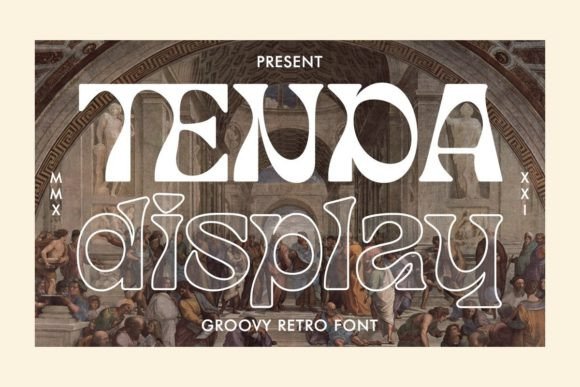
In the world of typography, finding the right font for a project can be as crucial as selecting the right tools for any creative endeavor. Tenda is a versatile typeface that offers both simplicity and charm—making it an excellent choice for professionals who want to maintain readability while adding a touch of personality to their work. Specifically, Tenda Display stands out with its bold emotional character, which makes it ideal for headlines, logos, and other visual elements where impact matters most.
Understanding Tenda’s Role in Typography
Tenda is not just another decorative font; it's a well-crafted design that balances clean lines with subtle whimsical touches. This duality allows it to function effectively across various stages of a project—from initial brainstorming to final presentation. The font is especially useful in branding, editorial design, digital marketing materials, and creative projects where visual storytelling plays a key role.
Tenda Display, in particular, is tailored for display settings. It brings attention to important text through its unique structure and expressive glyphs. Whether you're designing a website header, a social media post, or print collateral, this font helps your message stand out without overwhelming the viewer.
Opentype Features Enhance Creative Control
One of the standout features of Tenda Display is its support for Opentype functions. These advanced typographic tools allow designers to access alternate letters and ligatures seamlessly, enhancing the font's adaptability. For example, when crafting a logo or headline, these variations can add subtle flair that elevates the overall design aesthetic without sacrificing legibility.
The presence of alternate characters means that Tenda Display isn’t limited to one style. You can switch between different versions of the same letter to find the perfect match for your brand voice or project tone. Ligatures further streamline the appearance of text by combining common letter pairs into single, elegant forms—ideal for high-quality print or web-based content where every detail counts.
Integrating Tenda Into Your Workflow
Typographic choices are often made at the intersection of creativity and functionality. Tenda fits naturally into workflows that require both. Here’s how it can be used before, during, and after a project:
- Before a project: Use Tenda in mood boards or concept sketches to visualize how the font will interact with colors, imagery, and layout. Its emotional character helps set the tone early on.
- During development: Incorporate Tenda Display into wireframes, mockups, and prototypes. Test how it performs in different sizes and environments to ensure it aligns with your project goals.
- After completion: Review final deliverables with Tenda to confirm that the font maintains consistency and clarity across all platforms and formats.
Its PUA (PostScript Unicode) encoding simplifies access to special glyphs and ligatures. Unlike standard fonts that rely solely on basic character sets, PUA-encoded fonts offer expanded options through custom menus in design software like Adobe Illustrator or Photoshop. This ensures that even users unfamiliar with advanced typographic controls can easily leverage the font’s full potential.
Use Cases Across Industries
Tenda Display finds relevance in several industries thanks to its ability to blend form and function. For instance:
- Marketing and Advertising: Use Tenda in headlines for posters, billboards, or digital banners. Its boldness draws the eye, while the whimsical details make it memorable.
- Web Development: Apply Tenda Display to hero sections, call-to-action buttons, or section titles. Ensure compatibility by checking how it renders on different browsers and devices.
- Graphic Design: Pair Tenda with more neutral body fonts to create contrast. Its distinct character works well in packaging, invitations, and branding assets.
- Education and Publishing: Use Tenda in chapter headings, infographics, or educational posters to break up dense content and guide the reader visually.
Practical Tips for Using Tenda Display Effectively
To get the most from Tenda Display, consider these practical implementation tips:
- Start with the basics: Before diving into ligatures or alternates, ensure the font reads clearly at different sizes. Sometimes less is more, especially in small text areas.
- Test cross-platform compatibility: If you're using Tenda Display in digital projects, check how it looks on iOS, Android, Windows, and macOS. Consider converting text to outlines if precise rendering is essential.
- Pair it wisely: Tenda Display’s strong character means it needs a complementary body font. Look for sans-serif or serif options that provide good contrast but don’t clash.
- Organize your glyphs: When working with multiple alternate characters, keep a record of which ones you use and where. This helps maintain consistency, especially in large-scale projects.
- Use sparingly: While Tenda Display is expressive, overuse can reduce its effectiveness. Reserve it for key visual elements rather than entire blocks of text.
Workflow Example: Branding a New Product Launch
Let’s walk through a real-world example of how Tenda might fit into a workflow. Suppose you’re tasked with creating a new product launch for a lifestyle brand targeting young adults. Here’s how Tenda could enhance your process:
- Research and Planning: Identify the brand’s personality. If the brand is playful yet professional, Tenda Display may be a good match due to its balance of whimsy and strength.
- Design Concept: Create a mood board using Tenda Display for key headers and Tenda for supporting text. This helps stakeholders visualize the brand’s voice and feel.
- Mockup Creation: Build out landing pages, social graphics, and packaging mockups. Use the alternate characters and ligatures to fine-tune the look for each asset.
- Client Feedback: Present the designs with clear explanations of why Tenda was chosen. Highlight how its emotional character supports the brand’s messaging and improves user engagement.
- Final Implementation: Once approved, embed the font into web and print files. Optimize for performance by using font subsets where possible and ensuring accessibility standards are met.
Factors to Consider When Working with Tenda
Several factors influence how Tenda Display integrates into your workflow:
Preparation
Before starting any project, evaluate whether Tenda Display meets your needs. Ask yourself:
- Does it align with the project’s tone and audience?
- Will it perform well in the intended format (digital vs. print)?
- Are there enough stylistic options to meet your design goals?
Compatibility
While Tenda Display is designed for flexibility, always verify compatibility with your design and publishing platforms. Some systems may not fully support Opentype features unless they are specifically enabled. Tools like Font Squirrel’s Webfont Generator can help convert the font into a format suitable for websites while preserving its advanced styling capabilities.
Usability and Organization
When using multiple glyph styles, organize them in a consistent manner. Name layers or text styles clearly in design software so team members or clients can quickly understand the hierarchy and purpose of each element. This also makes revisions and updates more efficient.
Efficiency and Consistency
Efficiency is key in any professional setting. Tenda Display streamlines the design process by offering built-in stylistic variations. Rather than sourcing multiple fonts for different moods, you can stay within a cohesive family. However, maintain consistency by applying the same glyph styles throughout your project to avoid visual fragmentation.
Quality Control and Long-Term Use
During quality checks, review how Tenda Display appears in different contexts. Does it scale well? Are ligatures displayed correctly? Also, think about long-term use. If the font is part of a brand identity, ensure it remains relevant and readable as trends evolve. Tenda’s timeless design makes it a strong candidate for enduring use.
How Tenda Fits With Other Tools and Methods
Tenda Display doesn’t exist in isolation—it interacts well with many tools and methods commonly used in creative workflows. For instance:
- Adobe Creative Suite: Access alternate characters via the Glyphs panel in Illustrator or Photoshop. This is particularly helpful for refining logos or headlines.
- Canva or Figma: Use Tenda in collaborative design environments to maintain brand consistency across teams. Ensure everyone has access to the same font file or web version.
- Content Management Systems (CMS): If embedding Tenda on a website, use @font-face declarations and test loading times. Prioritize performance by limiting the number of weights and styles loaded.
- Print Production: Confirm that the printer supports the font’s full feature set. If not, export the text as vector shapes to preserve the exact design.
Additionally, Tenda can be paired with color theory, grid systems, and responsive design principles to create harmonious layouts. Its structured yet expressive nature complements modern design methodologies that prioritize both aesthetics and usability.
Conclusion
Tenda is more than just a font—it's a strategic tool for designers and creators aiming to communicate with clarity and emotion. By leveraging the advanced features of Tenda Display, such as alternate characters and ligatures, you can elevate your projects without compromising on readability. Its PUA encoding and broad compatibility make it accessible and easy to implement, while its emotional character adds depth to your visual storytelling.
Whether you're building a brand, launching a product, or crafting educational materials, Tenda offers a reliable and expressive solution. With thoughtful preparation, integration, and maintenance, it can become a valuable part of your typographic toolkit—supporting your creative goals and enhancing the outcomes of your work.